
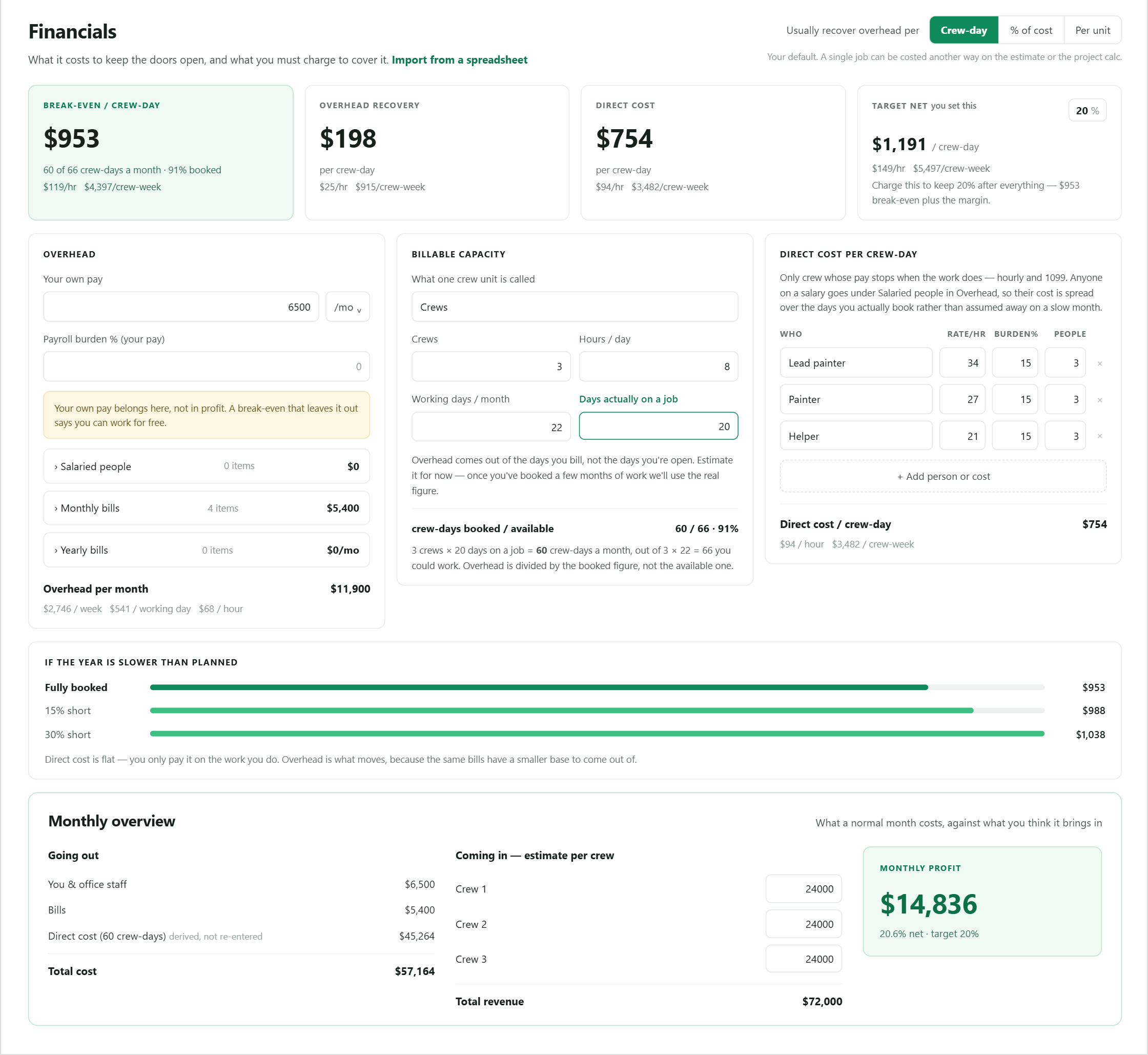
Enter company costs
Record payroll, owner compensation, overhead, and recurring operating expenses.
Profit & Margin Control
Turn payroll, overhead, owner compensation, and field capacity into a cost basis you can use before the bid leaves your desk.
Why it matters
A markup can look healthy while payroll and overhead erase the margin. BidPilot models the company cost basis before measuring the job.
How it works
Each step stays visible, editable, and connected to the same job.
Record payroll, owner compensation, overhead, and recurring operating expenses.
Turn those inputs and working capacity into a daily and hourly cost basis.
Snapshot the appropriate company rate onto the estimate.
Compare the client price with the modeled cost of completing the work.
Built into the workflow
See the combined cost of field labor and company overhead for a working day.
Understand the hourly cost implied by the company model.
Include expenses that a flat labor rate usually leaves out.
Review job margin against the rate carried by the estimate.
New estimates start at your configured target margin, and the AI estimator is told to stop once it clears that target instead of padding past it.
Keep exploring
Questions
Straight answers about how this part of BidPilot works.
Start free and teach BidPilot the rest as you work.
Start free trial