Built around your numbers

Estimates that price
the way you do.

Not a generic price list. Build estimates from your company costs, past jobs, and corrections.

7 days · 5 AI estimates · no card up front

Your numbers. Your estimate.Scope → pricing → proposal
From job details to a draft
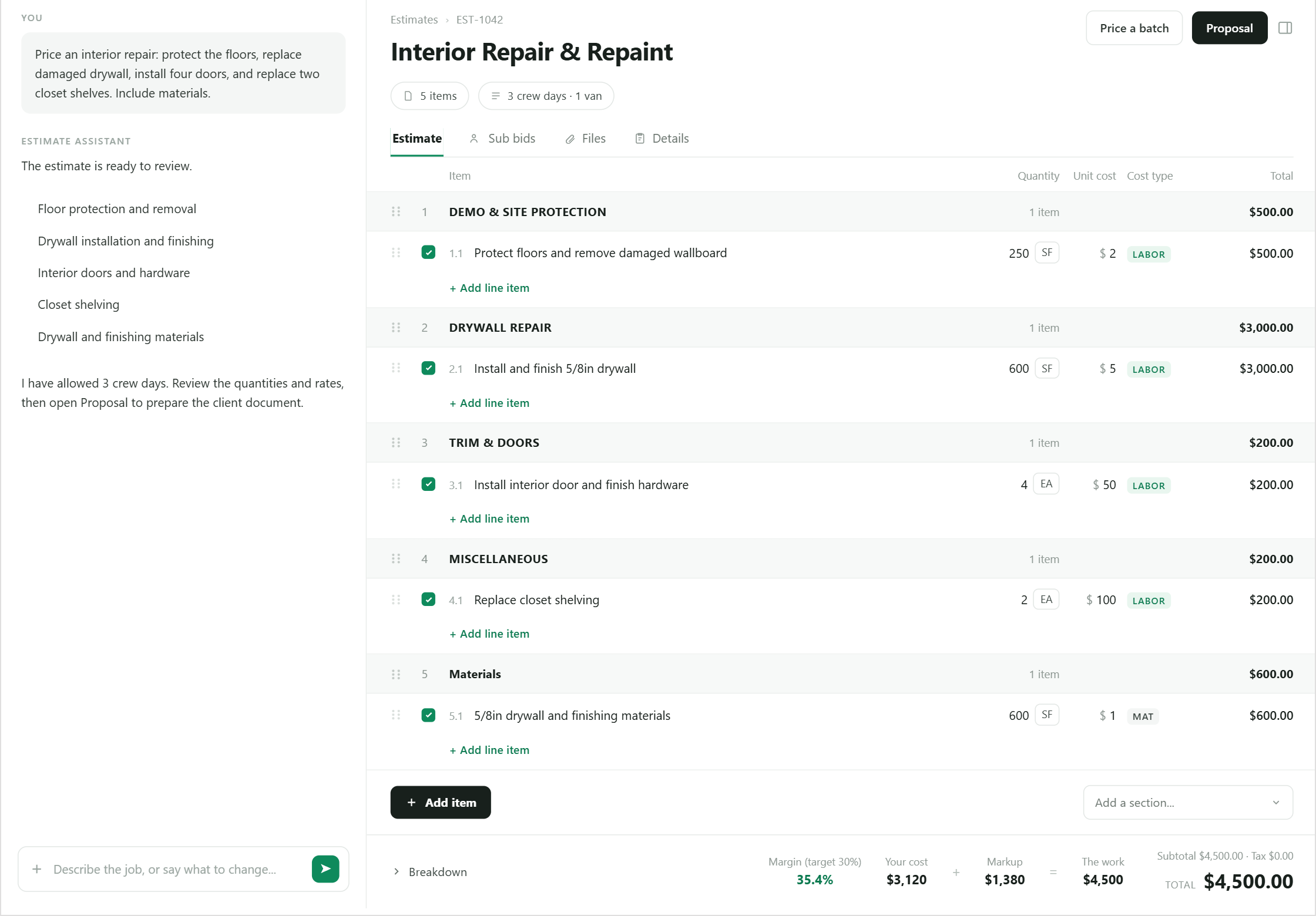
BidPilot estimate workspace with editable scope, quantities, rates, and totals
Swipe to explore the product preview

Job details become a draft scope you can review. Illustrative demo.

See how your data fits in BidPilot.Try the migration review before creating an account.
Try your data

Generic estimating software misses the numbers that make your company yours.

Your actual costsLabor, overhead, and production
Your past jobsReal precedent from work you priced
Your correctionsRules that carry into the next estimate

How it works

Your next estimate starts smarter.

Describe the job. Review the draft. Keep the corrections that belong to your business.

  1. 01

    Describe the job

    Start with conversation, photos, files, and the job details already in front of you.

    Job detailsInterior repaint

    Occupied home · walls and trim

    Photos + scope notes attached
  2. 02

    Review the draft

    Inspect the structured scope, quantities, rates, assumptions, and totals.

    Your reviewScope. Rates. Assumptions.

    Check the draft against the job.

    Every line stays editable
  3. 03

    Correct your way

    Change the rate, production assumption, or scope rule in plain language.

    Your correction“Use premium prep here.”

    Adjust the draft in plain language.

    Choose whether to keep the rule
  4. 04

    Reuse the rule

    Carry general company guidance into the estimates that come after it.

    Next estimateYour rule, ready to reuse.

    Premium prep for occupied homes.

    Edit or remove it any time

Illustrative workflow · You review the estimate and choose which rules to keep.

Every line, ready for your review
Interior Repair & Repaint

Floor protection · drywall · doors · shelving

Example estimate: $3,900

Scope, quantities, and prices stay editable. Example estimate: $3,900.

From scope to the next estimate

One job, all the way through.

See the decisions that connect a reviewed estimate, agreed scope, crew checks and actual costs.

Fictional example · USD
Step 1 of 8

Describe the work

Start with occupied rooms, surfaces, access and the optional trim upgrade.

Explore job inputs
BBidPilotIllustrative view

Occupied interior repaint

Job details

Repaint occupied interior walls and ceilings. Protect floors and adjacent finishes. Offer a premium trim finish as an optional upgrade.
Occupied roomsFloor protectionOptional trim

Scope notes become a draft for your review.
Step 2 of 8

Review the estimate

Review the base scope and keep the optional upgrade separate.

Explore AI estimating
BBidPilotIllustrative view

Occupied interior repaint

Interior repaintWalls, ceilings and floor protection
$3,500.00
Optional upgradePremium trim finish upgrade+ $400.00
With the trim upgrade
$3,900.00

Review the scope and price before sending.

Step 3 of 8

Understand the price

Check the labor, materials and equipment allowances before sending.

Explore Financials
BBidPilotIllustrative view

Occupied interior repaint

Private estimating view · with trim upgrade

40 person-hours × $40.00
$1,600.00
Materials
$800.00
Equipment
$200.00
Original estimated cost
$2,600.00

Company allocation is set to $0.00 in this fictional example.

Cost allowances reviewed
Step 4 of 8

Approve the scope

The customer accepts the base proposal and the trim upgrade.

Explore proposals
BBidPilotIllustrative view

Occupied interior repaint

Customer proposal

Base proposal
$3,500.00
Premium trim finish upgrade
$400.00
Accepted agreement
$3,900.00
Customer accepted the trim upgrade
Fictional customerAccepted scope saved
Step 5 of 8

Agree on extra work

Approve additional floor protection before adding it to the job.

Explore reviewed proposals
BBidPilotIllustrative view

Occupied interior repaint

Agreed extra work

Additional floor protection

Extra protection labor and supplies, approved before the work is added.

Customer approved
Original accepted agreement
$3,900.00
Approved change
$300.00
Agreement with change
$4,200.00

The reviewed budget increases by $100.00 for the added work.

Step 6 of 8

Give the crew a clear plan

Turn accepted scope into instructions, required photos and reviewed completion checks.

Explore team estimating
BBidPilotIllustrative view

Occupied interior repaint

Accepted scope → crew checks

  • Protect occupied floors
  • Repaint walls and ceilings
  • Premium trim finish upgrade
  • Additional floor protection
Required protection photographOriginal evidence retained
Scope acknowledgedCompletion reviewed
Job completion confirmed
Step 7 of 8

Review actual costs

Review approved receipts and labor, linked-site spending and explained differences.

Explore job costs
BBidPilotIllustrative view

Occupied interior repaint

Private job cost review

CostBudgetActual
Labor$1,680.00$1,760.00
Materials$820.00$840.00
Equipment$200.00$200.00
Total$2,700.00$2,800.00
$100.00 over budget$1,400.00 profit before tax

44 approved person-hours · reviewed receipts · linked-site spending included

Cost closeout reviewed
Step 8 of 8

Approve a lesson

The owner decides which job lessons should guide later applicable estimates.

Explore company guidance
BBidPilotIllustrative view

Occupied interior repaint

Owner decision

Include a separate floor-protection labor allowance for occupied interior repaints.
PaintingOccupied interiors
Explicitly approved as company guidance
Later matching draft

Review a separate floor-protection allowance.

The owner edits the wording and conditions. Each future estimate still receives its own review.

The difference

Why BidPilot, not another AI estimator

A draft is useful. A draft that understands your company—and stays fully reviewable—is more useful.

Other toolsBidPilot
Start from catalog or market averagesStarts from your company pricing
Generate a draftKeeps scope, quantities, and rates editable
Show markupCalculates cost basis and margin
Forget correctionsReuses learned company rules

Every estimate, tracked

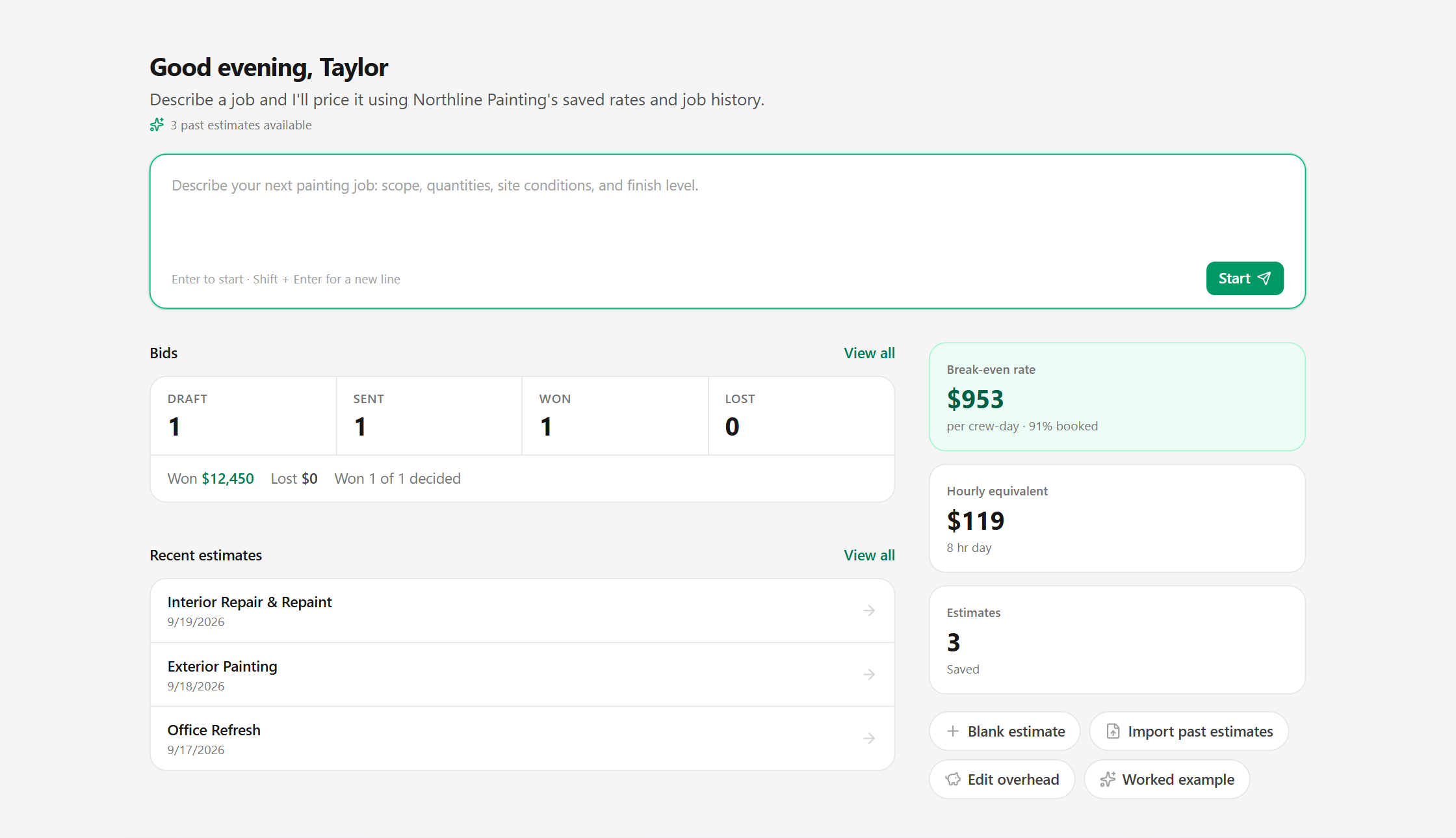
One home screen for every bid you have out.

See drafts, sent bids, and wins at a glance, then jump straight back into the estimate that needs attention.

  • Break-even rate and bid status up front
  • Recent estimates one click away
  • Start from a blank estimate or a past one
Explore estimates from files
BidPilot home screen showing break-even rate, bid status, and recent estimates
Swipe to explore the product preview

Documented renovation example

The inputs can matter more than the AI.

A generic estimator priced this renovation at $35,896.

The contractor's won bid was $25,114.

The difference: real crew costs, overhead, and company-specific scope.

An early BidPilot draft of the same job came in well under the won bid, because it missed scope. Your costs set the rate; you still review the scope.

Single anonymized estimate comparison. Results vary; this is not a savings or accuracy promise.
Generic estimate$35,896
Contractor's won bid$25,114

One documented job. Two very different inputs.

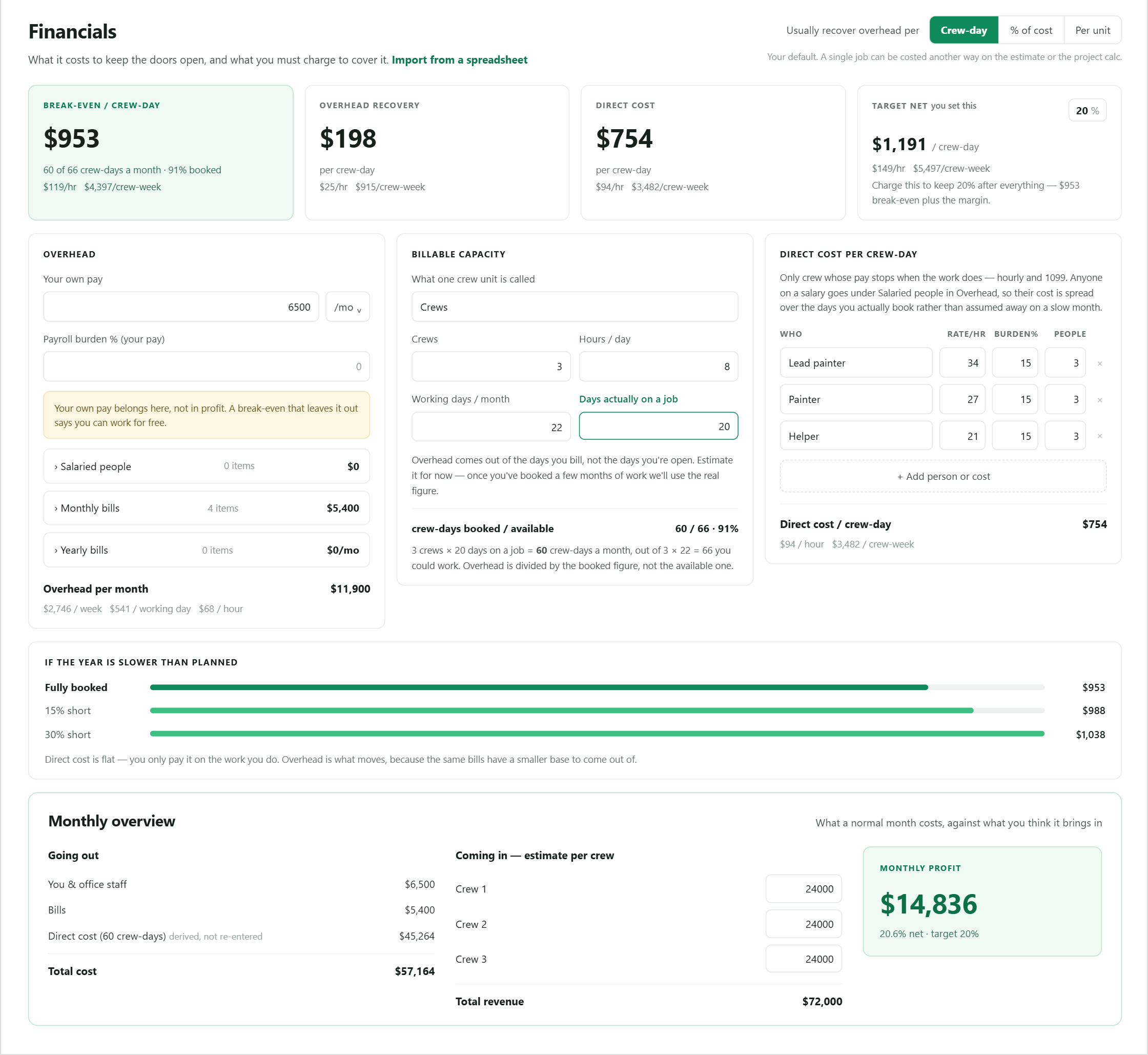
Financials

A 20% markup is not proof of profit.

Payroll, owner pay, overhead, burden, and available crew days determine whether a bid actually makes money. BidPilot turns those inputs into a cost per crew-day so every estimate can be checked against the business behind it.

  • Company-specific cost basis
  • Crew-day and hourly break-even
  • Margin visibility on every estimate
Explore Financials
Know your costs before you bid
BidPilot Financials workspace showing company costs, capacity, and break-even metrics
Swipe to explore the product preview

Company costs set your break-even. Illustrative company figures.

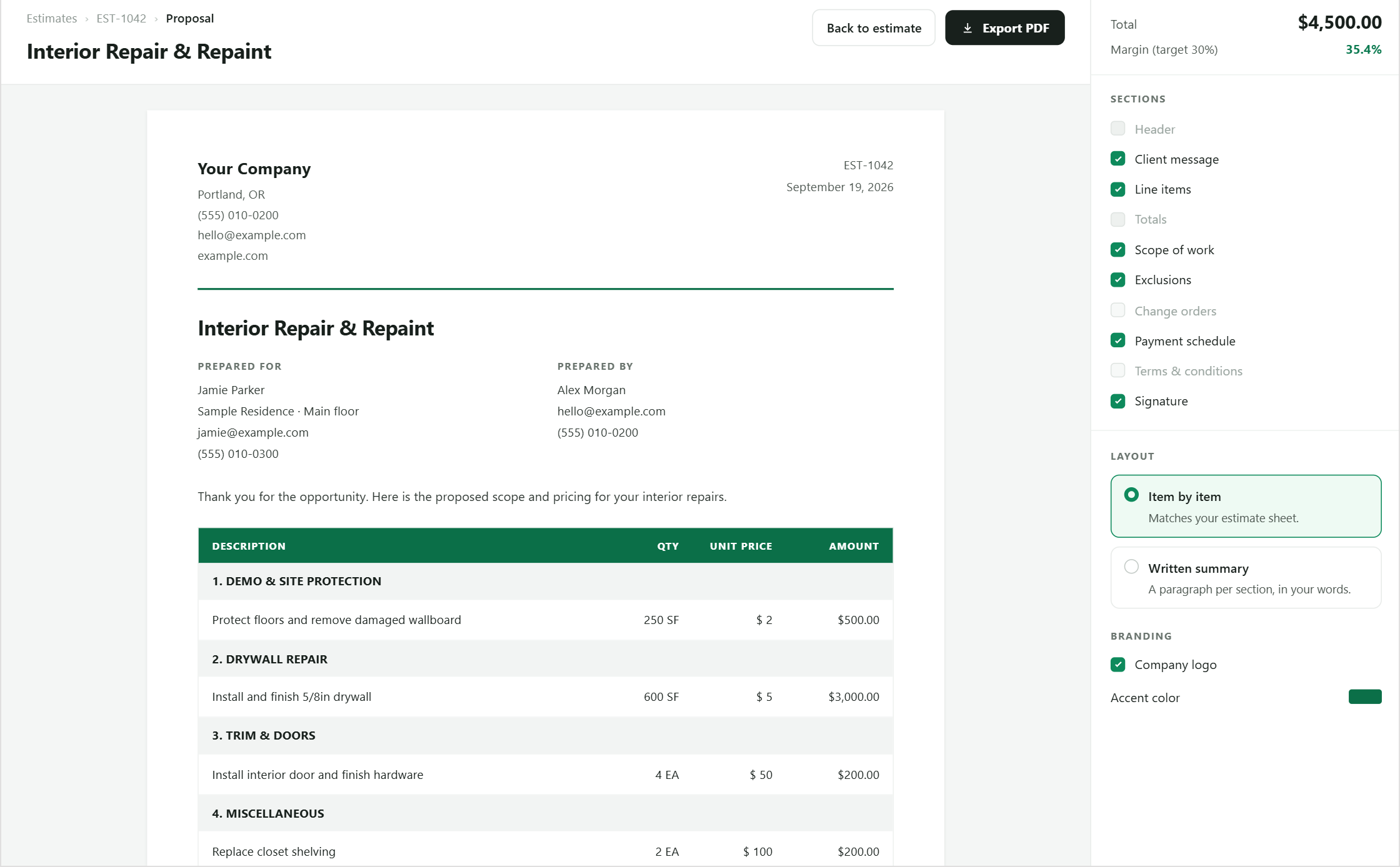
BidPilot proposal editor with a branded client proposal preview
Swipe to explore the product preview

Proposals

Turn the reviewed estimate into a document clients sign.

Every line item, total, and scope note carries over automatically. Toggle what shows, add your branding, and export a client-ready PDF.

  • Line-by-line or written summary layout
  • Scope, exclusions, and payment schedule included
  • Your logo and accent color
Explore proposals

Compare

Not every AI estimator learns your business.

HandoffBolsterBuildxact
ApproachWhat it starts withBest fit
BidPilotYour costs, history, and rulesCompany-specific estimating
Catalog AIMarket and supplier dataFast market-based pricing
Management suitesEnd-to-end job workflowBroader operations
Compare BidPilot

Support

Answers when the estimate cannot wait.

A searchable help center for setup, estimates, pricing, Financials, proposals, team access, and billing.

Visit support

Start with your next job

Try it with your numbers.

7 days. 5 AI estimates. No card up front.

Good questions

A little clarity before your first bid.

Can I use my own pricing and past estimates?

Yes. Import your catalog and past estimates during setup. BidPilot uses your company costs, pricing, and job history when drafting estimates.

What does BidPilot learn from my corrections?

You choose which corrections to keep as company rules. Those rules carry into later estimates, and you can edit or remove them. You still review each estimate’s scope, quantities, and assumptions.

Do I need a credit card to try it?

No. Your 7-day trial includes 5 AI estimates, with no card up front.

Can I edit the estimate before sending a proposal?

Yes. Scope, quantities, rates, and totals stay editable. Turn the reviewed estimate into a branded proposal when you are ready.

Your next estimate should start with what you already know.

Start with your numbers. Teach BidPilot the rest as you work.

Start free trial