
Bring the job
Describe the scope or add the files already in front of you.
AI Estimating
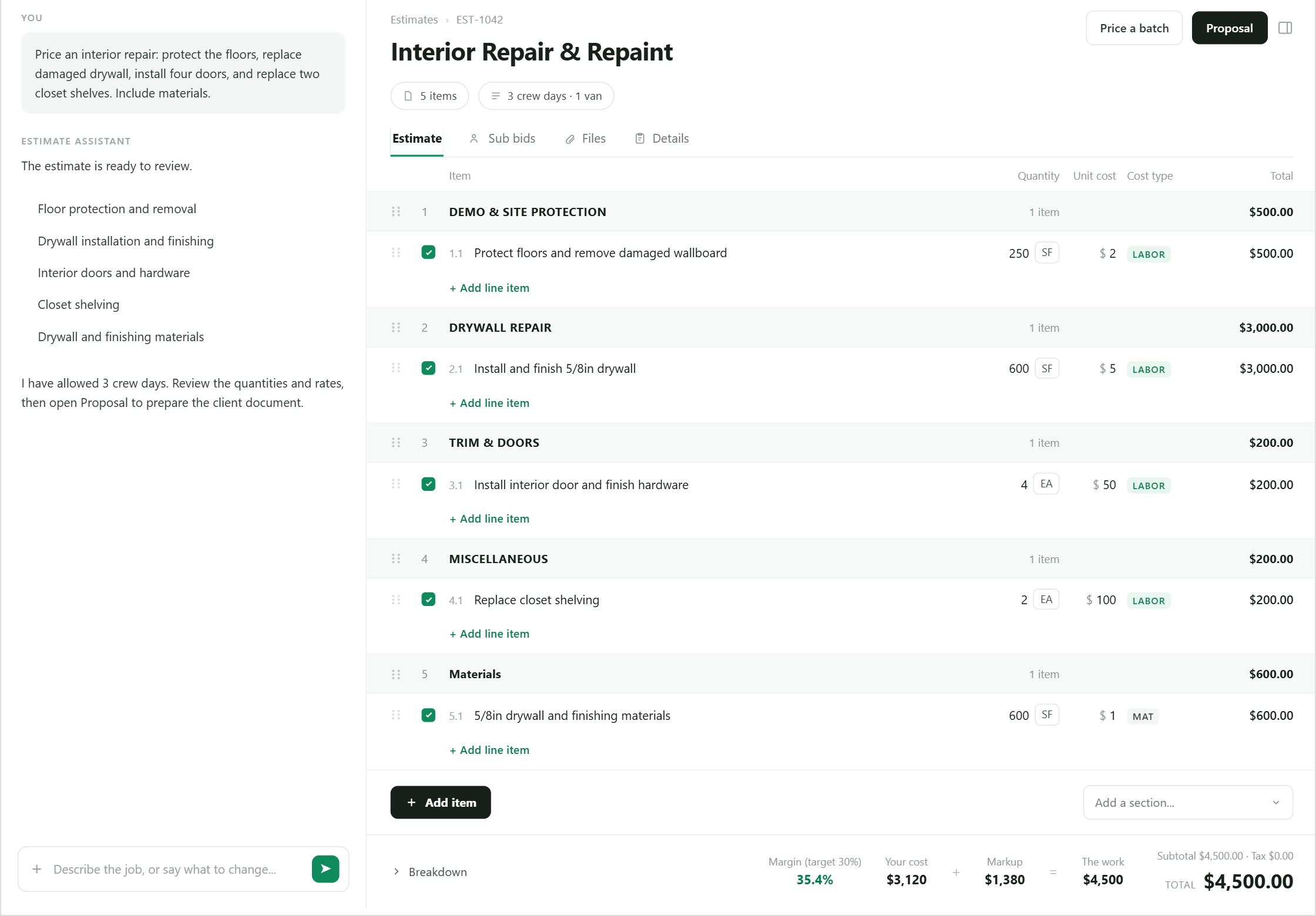
Build a structured estimate from notes, files, photos, and conversation—then review every line before it reaches a client.
Why it matters
BidPilot keeps the scope, quantities, rates, and totals structured and editable while the AI works alongside you.
How it works
Each step stays visible, editable, and connected to the same job.
Describe the scope or add the files already in front of you.
Inspect sections, quantities, rates, assumptions, and exclusions.
Change the estimate in plain language or edit a line directly.
Create a branded proposal from the approved estimate.
Built into the workflow
AI changes land in an estimate you can inspect and edit.
Use job material as context without retyping it first.
Check the estimate against the company cost basis.
Each estimate credit includes unlimited AI follow-up messages on that estimate; manual edits stay unlimited too.
Keep exploring
Questions
Straight answers about how this part of BidPilot works.
Yes. BidPilot keeps line items editable alongside conversational changes.
No. One credit covers every AI message on that estimate, with no separate follow-up limit. Manual edits remain unlimited.
Start free and teach BidPilot the rest as you work.